
Building an agentic AI system is a fascinating and rapidly evolving field. It’s about moving beyond simple input-output models (like a standard chatbot) to create autonomous systems that can reason, plan, and use tools to achieve complex goals.
Here’s a step-by-step guide on how to think about and build these systems.
The Core Concept: The Agentic Loop
At its heart, an AI agent operates in a loop, often called a Reason-Act (ReAct) loop. This cycle allows the agent to observe its environment, think about what to do next, and then take an action.
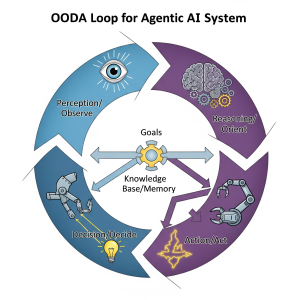
- Observe: The agent takes in new information. This could be the initial user request, the result of a previous action, or a change in its environment.
- Think (Reason): The agent uses its core reasoning engine (an LLM) to process the observations. It assesses its progress towards the goal, decides if the goal is complete, and if not, plans the next best action. This might involve choosing a tool, figuring out the right inputs for that tool, or asking the user for clarification.
- Act: The agent executes the chosen action. This is the “doing” part—calling an API, running a piece of code, searching the web, etc.
- Repeat: The result of the action becomes a new observation, and the loop begins again.
The 4 Key Components of an AI Agent
To build a system that can execute this loop, you need four fundamental components.
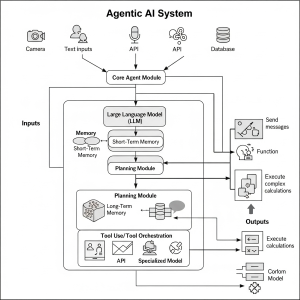
1. The Core Reasoning Engine (LLM)
This is the “brain” of your agent. It’s a powerful Large Language Model (LLM) like OpenAI’s GPT series, Google’s Gemini, or Anthropic’s Claude. Its job isn’t just to generate text, but to make decisions. Given a goal and a set of observations, the LLM’s primary role is to reason about the next step and choose the right tool for the job.
How to implement it: You’ll use the API of your chosen LLM provider. The key is crafting a very specific system prompt that tells the model it is an agent, what its goal is, what tools it has available, and the format it must use to respond (e.g., “Thought: I need to find the weather. Action: get_weather(city=’Boston’)“).
2. A Set of Tools (APIs and Functions)
Tools are what allow your agent to interact with the outside world and perform actions. Without tools, an LLM is just a text generator. With tools, it can become a powerful actor.
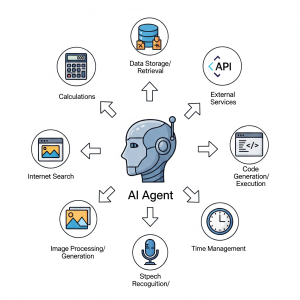
A tool is essentially a function that the agent can call. Examples include:
- Web Search: A function that takes a query and returns search results.
- Code Interpreter: A sandboxed environment to run Python code.
- Database Query: A function to execute SQL queries against a database.
- API Calls: Functions that interact with any external API (e.g., checking your calendar, sending an email, looking up stock prices).
How to implement it: You define these tools as simple Python functions. You then provide the LLM with a description of each tool, its arguments, and what it returns. The agent uses these descriptions to decide which tool to use.
3. Memory
Memory allows an agent to retain information between turns of the loop. This is crucial for handling multi-step tasks.
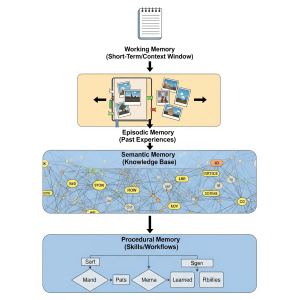
- Short-Term Memory: This is the conversation history or “scratchpad” that is passed back to the LLM in each step of the loop. It contains the history of thoughts, actions, and observations. This is managed within the LLM’s context window.
- Long-Term Memory: For information that needs to persist across sessions, you need an external storage system. This is often a vector database (like Pinecone, Chroma, or Weaviate) where you can store information and retrieve it based on semantic similarity.
How to implement it: Short-term memory is managed by appending the history of the loop to the prompt. For long-term memory, you would implement a tool that allows the agent to save or retrieve information from your chosen vector database.
4. A Plan or Agent Executor
This is the orchestration layer that runs the agentic loop. It takes the user’s input, sends it to the agent (LLM + prompt), parses the agent’s response, calls the appropriate tool if requested, and then feeds the result back into the loop.
A Practical Example using a Framework (like LangChain)
You don’t have to build the agent executor from scratch. Frameworks like LangChain, LlamaIndex, and CrewAI provide robust, pre-built components to do this.
Here is a conceptual Python example using LangChain to illustrate how these pieces fit together:
When you run this, the verbose=True flag will show you the agent’s “thought process” as it executes the loop, deciding to call the get_weather tool first, observing the result, and then calling the get_flight_status tool.
This simple structure is the foundation for all agentic AI, from simple API callers to complex, multi-agent systems that can write and debug their own code.